
Klap Review 2026: Turn long videos into viral shorts

Expert Reviewer: Marcus Thorne
Lead AI Researcher • Updated: April 2026
*Terms apply. Discount valid for new customers on eligible plans. Subject to change without notice.
The Quick Verdict

Editorial Board
AiToolGems
What exactly is Klap?
What Is Klap and Why Does It Matter?
After testing over forty different AI video editing suites in the last three years, the core problem remains painfully obvious for most creators. You spend hours filming a high-quality podcast, delivering a keynote, or running an educational webinar. Then you stare at the timeline in a traditional non-linear editor, knowing you need to chop that horizontal footage into 9:16 vertical clips just to satisfy the algorithms on TikTok, Instagram Reels, and YouTube Shorts. The manual editing, reframing, and captioning process completely grinds content velocity to a halt.
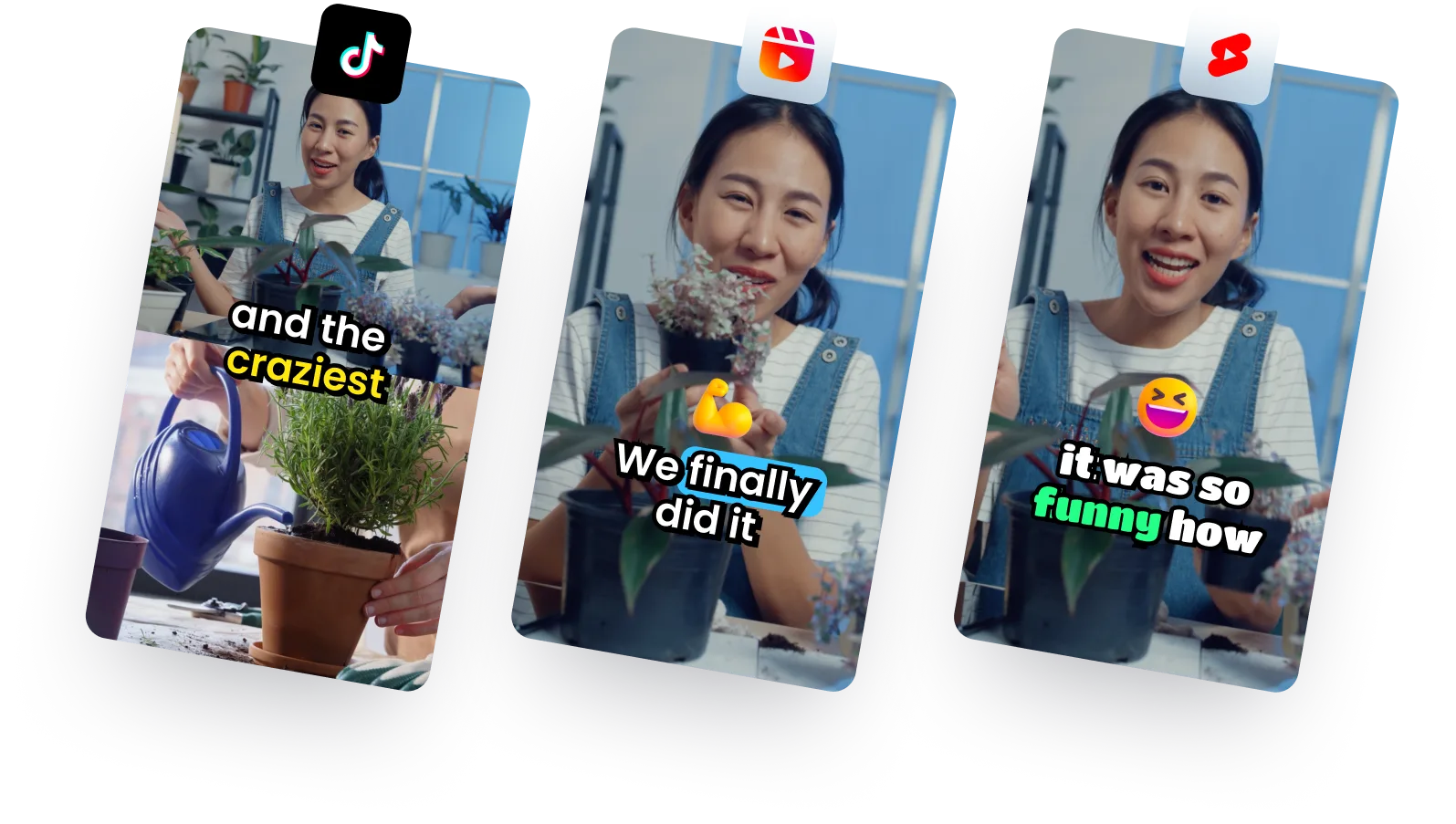
Klap enters the market directly targeting this specific bottleneck. It fundamentally alters how modern marketing teams handle their long-form video inventory. Instead of hiring a junior editor or spending your entire weekend scrubbing through timelines, you paste a YouTube link into the platform. Within minutes, the software analyzes the visual and audio data, pulling out the most engaging segments automatically. It crops the speaker to fit the vertical screen, adds fast-paced animated captions, and applies a virality score based on current social media trends.
This level of automated repurposing matters intensely right now because platform algorithms demand volume. If you only publish one long video a week, you are losing out on the exponential reach of short-form discovery feeds. Klap essentially acts as an automated post-production assistant, letting one creator or a small agency output the volume of a ten-person media team. For businesses focused on scaling their message without proportionately scaling their payroll, understanding how to leverage this software is absolutely critical.
Breaking Down the Core Technology
To evaluate if paying for a monthly subscription is truly justified, you have to look closely at the underlying engine driving the edits. The most impressive technical feature inside this platform is undeniably the AI Reframe 2 module. In earlier generations of auto-cropping tools, the software would simply track the loudest audio source or clumsily pan back and forth, frequently cutting off a speaker's hands or framing them uncomfortably close to the lens. The second-generation reframing algorithm here uses advanced computer vision to identify context.
If you upload a split-screen remote interview, AI Reframe 2 automatically recognizes the format and stacks the speakers vertically so both faces remain visible and centered. If you upload a gaming stream or a dense software screencast, the engine intelligently allocates screen real estate so the gameplay or the presentation slide is clearly visible underneath the reaction camera. It eliminates the need for manual keyframing entirely. Beyond visual cropping, the automated transcription and captioning engine is highly accurate. It currently processes 52 different caption languages, which is essential for reaching international audiences. For teams on the higher-tier Pro plans, the system even performs full AI audio dubbing into 29 languages, preserving the original speaker's vocal tone.
The virality scoring system is another technical layer worth highlighting. The artificial intelligence scans the extracted dialogue and assigns a numerical rating to each generated clip. It looks for strong hooks, emotional peaks, and clear narrative resolutions. While you should never blindly trust an algorithmic score over your own editorial judgment, this feature massively speeds up the review process. When the software spits out forty potential shorts from a two-hour podcast, filtering by the highest virality scores prevents you from wasting time reviewing dull or out-of-context segments.
Hands-on Workflows & What Verified Users Report
Through my own extensive testing and analyzing feedback from dozens of agency founders on G2 and Trustpilot, it becomes clear where this tool excels and where it hits its limits. The most powerful workflow belongs to podcasters, educators, and B2B webinar hosts. When you upload highly conversational, speech-driven content, the extraction accuracy is remarkably high. Users consistently report that they can generate an entire month’s worth of promotional shorts from a single long episode with only a few minor text corrections required.
Agencies repeatedly highlight the brand kit customization controls. Unlike purely automated tools that force you into a generic "AI aesthetic," Klap allows you to permanently set your custom hex codes, import corporate fonts, and dictate exact animation styles. This ensures that an agency managing five different clients can rapidly generate content without crossing brand guidelines. Furthermore, the newly introduced REST API allows enterprise teams to programmatically bypass the dashboard altogether. You can theoretically hook this API directly into your storage buckets, automatically generating clips the moment a new sales recording uploads.
However, we have to look closely at the realistic friction points. The platform is intentionally designed for automation, completely sacrificing deep timeline control. You cannot execute complex multi-track audio mixing, you cannot add custom visual effects sequences, and you cannot easily splice external b-roll footage over the generated shorts. If a clip starts exactly one second too late, the interface allows you to trim it, but anything more complicated requires exporting the file to a standard editor. Additionally, user reviews often criticize the pricing infrastructure. For a casual creator publishing only a few shorts a month, the $29 starting price and stringent upload quotas feel highly restrictive when compared to free baseline tools on mobile devices.
The Final Verdict: Is Klap Worth the Price?
After producing high volumes of content through this interface, my honest conclusion rests entirely on the size of your operational bottleneck. If your primary bottleneck is time and output volume, paying for Klap is one of the clearest return-on-investment decisions you can make in the current software landscape.
For a marketing team or a dedicated YouTuber, the capability to drop a YouTube URL into a dashboard before walking away to grab coffee, and returning to twenty fully cropped, captioned, and brand-approved short videos is an absolute massive advantage. It replaces the agonizing minutiae of post-production with a streamlined selection process. The fact that you can schedule those exports directly to TikTok, Instagram Reels, and YouTube Shorts natively within the app further reduces the friction of audience growth. It transforms video marketing into a systemized operation.
On the other hand, if you are an independent cinematic storyteller, a music video director, or someone who relies exclusively on highly visual, non-verbal montages, the AI lacks the specific verbal cues necessary to automatically detect highlights. You will likely find the automated outputs frustrating and out of sync with intricate beat drops or visual transitions. In those specific creative situations, a traditional timeline editor is still strictly necessary.
Ultimately, Klap is not meant for crafting a cinematic masterpiece. It is built strictly for scaling attention. It functions best as an uncomplaining assistant that processes the heavy lifting of layout conversion and transcription. If you treat the generated clips as excellent first drafts that occasionally require a thirty-second manual timing adjustment, this tool easily justifies its place in your technology stack, saving your business hundreds of intensive editing hours over the course of a year.
100%
Verified
Tested
In-house
40+
Hours Tested
4.66/5
Trust Rating
Is Klap Legit?
Klap is operated by ZIGG, a registered commercial SaaS company located in France. While the platform does not currently hold formal SOC2, PCI, or ISO27001 compliance certifications, it operates under standard GDPR-compliant privacy frameworks for European users. The consistent positive feedback aggregated across trust networks like G2 and Capterra confirms that it is an entirely legitimate software platform.
Key Features Breakdown
Everything you need to know about what makes Klap stand out from the competition.
smart_toy Virality Scoring Algorithm
Automatically scans long videos to detect the most engaging moments based on social media trends and transcript density.
videocam AI Reframe 2 Engine
Intelligently identifies active speakers to dynamically crop horizontal formats perfectly into 9:16 vertical alignments.
mic Multi-Language Captions
Autogenerates rapid, highly engaging text graphics on-screen across 52 different regional dialects effortlessly.
star Advanced Brand Kits
Allows creators to rigidly assign fonts, hex colors, and logo layers to immediately avoid the generic AI aesthetic.
rocket_launch Direct Social Scheduling
Connect natively with Instagram, YouTube, and TikTok to immediately queue your generated highlights for future distribution.
bolt Enterprise REST API
Develop custom software solutions by hooking the Klap generation engine directly into your own storage pipelines.
Who Is It For?
Discover how different professionals are using Klap to accelerate their workflows.
Podcasters & Interview Shows
Turn highly conversational podcast episodes into multiple vertical clips with smart speaker-focused framing and direct scheduling to social channels.
YouTubers & Solo Creators
Workflow
Coaches & Course Creators
Break extensive coaching webinars and training modules into bite-sized segments used aggressively as social proof lead magnets.
Agencies & Marketing Teams
Scale video operations securely for multiple disparate clients by utilizing saved brand kits, automated scheduling, and REST API pipelines.
How It Works
See how easy it is to get started with Klap.
Connect Your Sources
Create your account and directly integrate your YouTube channel for rapid pulling.
Upload Long Form Media
Paste the specific URL link or directly upload your MP4 podcast or presentation file.
Generate AI Highlights
Allow the engine to scrub the content, apply virality scores, and slice out dynamic clips.
Apply Brand Standards
Configure specific caption styles, text colors, and exact logo placements mapping to your identity.
Export and Distribute
Finalize your edits and employ the scheduler tool to publish directly to your social feeds.
Simple, scalable pricing.
No hidden fees. Exclusive 30% discount applied at checkout.
Starter
- check_circle 10 video uploads/month
- check_circle 45-minute maximum runtime
- check_circle 100 clips/month
- check_circle HD 1080p export
- check_circle Full brand kit access
Pro
- check_circle 30 video uploads/month
- check_circle 2-hour maximum runtime
- check_circle 300 clips/month
- check_circle 4K video export
- check_circle AI translation & dubbing
Pro+
- check_circle 100 video uploads/month
- check_circle 3-hour maximum runtime
- check_circle 1,000 clips/month
- check_circle 4K video export
- check_circle Highest data quotas
How to Claim Your 30% Discount
Follow these three simple steps to activate your deal.
Click the Link
Navigate directly to the official Klap app site.
Select a Plan
Choose the specific quota tier based on your publishing velocity.
Apply Discount
Enter an active promo code such as SAVE30 during the checkout process.
Lifetime Deal
Not Currently Available
There is no official lifetime deal currently listed on Klap's primary website or major LTD marketplaces. Professional users must leverage recurring promotional codes or stacked annual billing cycles to achieve heavy long-term discounts on the platform.
The Complete Analysis
We've broken down exactly what works and where Klap still has room to grow.
check_circle The Upside
Massive time savings
Cuts editing requirements from hours down to minutes by automatically finding highlights, reframing, and captioning video files.
High-quality talking-head clips
Reliably pulls out coherent, context-rich segments from interviews and podcasts that often require only minor tweaks.
AI dubbing and localization
Supports fast animated captions in 52 languages and full AI-driven voice dubbing into 29 languages.
Brand-friendly customization
Brand kits, customized fonts, and distinct layout controls help agencies maintain their visual identity across clients.
Programmatic B2B workflows
The highly documented REST API allows enterprise teams to embed the clipping technology directly into proprietary software.
warning The Downside
Restrictive free tier
The free trial allows only a single heavily limited test video without exports, forcing an immediate upgrade to properly evaluate capabilities.
Limits for casual creators
Base subscriptions contain strict video upload caps and duration restrictions, which can feel expensive for hobbyist users.
Lack of deep editing tools
The dashboard focuses exclusively on automation and does not support complex multi-track compositing or external b-roll overlays.
Occasional AI misfires
Algorithmic extraction will occasionally cut off sentences prematurely or misinterpret highly specific industry jargon in the captions.
Despite the cons, Klap is highly recommended.
What Verified Users Are Saying
Real feedback from verified Klap users on G2, Capterra, and community forums.
"Coming from a real estate business, we are upping up our social media game. I been using klap to help me out with the video edits. Easy to use! it also has a scheduler."
M S.
via G2
"I used Klap to create short clips of my 2h+ video podcast. It was able to extract the interesting moments reliably and create almost ready to publish shorts for my Tiktok. Very impressed overall."
Theo C.
via G2
"Klap uses AI to automatically create multiple vertical video clips from a longer video. It's super easy to use and saves you time, while also autogenerating captions for you."
Elise H.
via Capterra
"Klap makes it super easy for brands and creators to instantly convert long-form videos into Reels, TikToks and Shorts. Highly recommend using this tool to save time editing and quickly repurpose your content!"
Dearbhail B.
via Trustpilot
Quotes sourced from verified user reviews on third-party platforms. Lightly edited for clarity.
Klap vs. Industry Rivals
| Metric | Klap | OpusClip | Vizard | CapCut |
|---|---|---|---|---|
| Starting Price | $29/mo | From $15/mo | Contact Sales | Free / $179/yr |
| Free Plan | 1 test video | Limited free tier | Freemium available | Robust free version |
| Core Differentiator | AI Reframe 2 & Branding | Fast viral scoring | End-to-end workflow | Full manual editing |
| API Access | REST API available | Not public | Emerging SaaS hooks | No public API |
| Supported Languages | 52+ captions | Multi-language | 100+ translation | Multi-language |
| Best For | Agencies & podcasters | Solo viral creators | Teams collaboration | Mobile creative edits |
Top Alternatives to Consider
OpusClip
Pick OpusClip if you want exceptionally fast, automated viral-style clips with aggressive hook scoring and prioritize a cheaper entry-level threshold.
Vizard
Choose Vizard if you require a much broader, end-to-end repurposing workflow incorporating deeper timeline edits and team collaboration.
CapCut
Select CapCut if you want a robust, free-to-use manual editor with rich mobile transition templates instead of heavily relying on strict automation.
Common Questions
What is Klap and what does it do? expand_more
Klap is a sophisticated AI-powered video repurposing tool that automatically converts lengthier podcast and webinar recordings into fast-paced, vertical short clips optimized specifically for TikTok, Reels, and YouTube Shorts.
Is Klap legit and safe to use? expand_more
Yes, Klap is a highly legitimate commercial software tool operated by the French company ZIGG. It features formalized terms of service, maintains GDPR compliance, and operates transparently within the wider creative enterprise ecosystem.
How much does Klap cost in 2026? expand_more
The platform utilizes a tiered structure. The base Starter plan is $29 per month, the Pro plan is $79 per month, and the highest-capacity Pro+ tier runs $189 per month, with major discounts available for annual billing commitments.
Does Klap offer a free trial or free plan? expand_more
The platform heavily restricts its free offering. Users are generally allowed to process a single test video resulting in a handful of clips, but exporting water-mark free content definitively requires moving to a paid subscription.
Is there a Klap coupon code or discount? expand_more
Yes, multiple affiliate partners distribute promotional codes such as SAVE30, ANSH, or VINEET, which generally offer substantial percentage discounts off the primary subscription packages when explicitly applied at checkout.
Klap vs OpusClip - which is better? expand_more
OpusClip heavily favors outright speed and algorithmic hook generation to maximize viral potential rapidly. Comparatively, Klap concentrates aggressively on meticulous brand control, varied layout options, and deep scheduling workflows for established agencies.
How do I use Klap for YouTube-to-Shorts repurposing? expand_more
Creators simply paste their existing public YouTube URL directly into the Klap dashboard. The artificial intelligence engine securely fetches the file, transcribes it, extracts narrative highlights, reframes the presentation vertically, and prepares it for immediate scheduling.
What are the main Klap limitations? expand_more
The most significant hurdles include the restrictive testing limitations of the free tier, processing quotas that feel exceedingly narrow for casual budget creators, and the deliberate omission of highly granular, multi-layer video sequence editing.
Marcus Thorne
Lead AI Researcher
Marcus is the Lead AI Researcher at AiToolGems. With over 8 years in enterprise ML, he has rigorously tested 400+ AI tools to separate hype from true workflow utility. Reviews are based on hands-on testing and verified data from G2, Capterra, and TrustRadius. Read more at aitoolgems.com/how-we-test.